EN
8 9
Connection issues
In case of pairing issues between the appliance and your domestic Wi-Fi network, refer to the
information listed on the following link:
https://www.compatibility.groupeseb.com/CompatibilityList-Pureair-Rowenta.pdf
https://www.compatibility.groupeseb.com/CompatibilityList-Pureair-Tefal.pdf
OPERATION
In order to achieve the best purication effect, your purier should be more than 60cm away from
the wall.
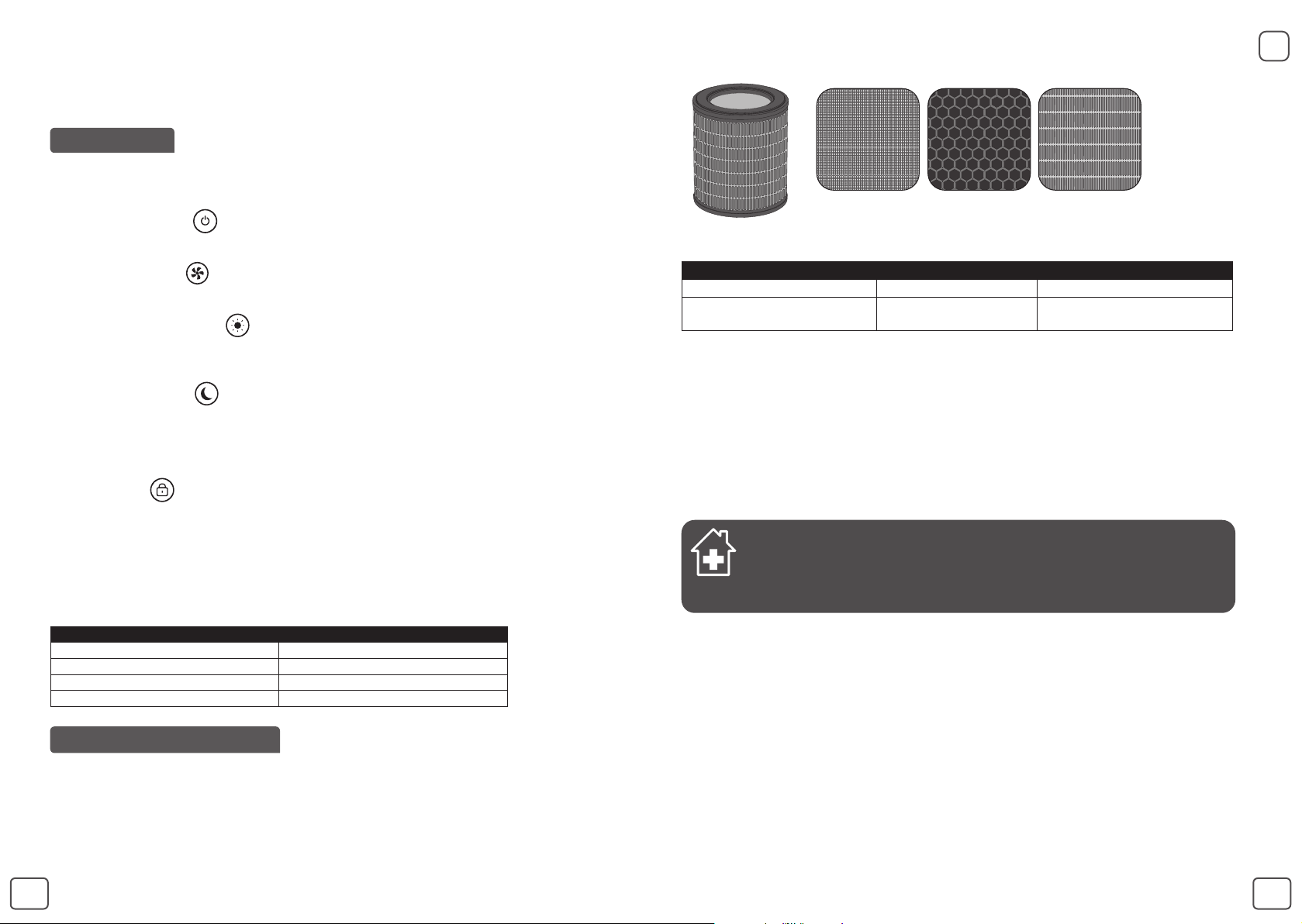
Power « Start/Stop (1) »
– Press this button to turn the air purier on/off.
« Speed selection (2) »
– You can choose manually the purication speed from speed 1 to Speed 6.
« Auto day mode button (4) »
– The purication speed is set to speed 2, speed 4 or speed 5 according to air quality level.
– If the air quality level is excellent then the device does not run.
« Auto Night Mode (5) »
– The purication speed is set to speed 1, speed 2 or speed 3 according to air quality level.
– If the air quality level is excellent then the device does not run.
– The lights on the device turn off automatically after 5 seconds. To turn the control panel back
on, press one of the buttons.
« Child lock (3) »
– The lock system prevents the purier from being accidentally mis-set during operation.
– To activate it, press the button (3) for 3 sec until the locked control panel indicator turns on.
To exit this mode, press the button (3) again for 5 seconds, until the indicator turns off.
When selected, the other buttons are locked.
• Indication of air quality
Air quality indicator is the light cercle around start/ stop button. Air quality indicator (7) is located
at the « Control panel (A) » of the appliance. The LED will indicate the air quality level:
Air Quality Air quality level color
Excellent Blue
Slight pollution Green
Moderate pollution Yellow
High pollution Red
CARE & MAINTENANCE
Before performing any maintenance work, always switch off the air purier using the « start/ stop button
(1) » and unplug it. Use a damp cloth to clean the surface of the product.
Important: Do not use any abrasive materials, as these may damage the surface of the product.
FILTER
This appliance is equipped with 3 types of lters:
Prefilter Active Carbon
filter
Particlefilter
Frequency of cleaning/replacing the lter :
Filter Action Cycles
Pre-lter
Clean (remove dust) Every 2 to 4 weeks
3-in-1 pre-lter, allergy+ lter
and active carbon
Replace
Every 12 months or when the
lter change indicator is lighted
The recommended frequency for replacing the lter may vary depending on the duration of use
and the operating environment.
IMPORTANT:
The lter change indicator (6) is lighted when the lter needs to be replaced. Once the lter has
been replaced, hold down the button for 5 seconds.
Forced reset:
If you have replaced the lter before its end of life, force the reset of lter cycle:
1. Hold the lter change indicator (6) for 5 seconds.
2. The indicator is lighted. Hold down the button for 5 seconds, to reset the lter cycle.
« TIPS FOR CHANGING FILTERS »
• Avoid handling used lters if you suffer from allergies or asthma.
• Wear gloves when changing the lters, or wash your hands well afterwards.
• Put used lters directly into a closed, air-tight bag before throwing them away to
avoid spreading pollutants.
POLLUTION SENSOR
The particles sensor need to be cleaned regularly (every 2 months) and appropriately.
Make sure you turn off and unplug the appliance before cleaning the pollution sensors and follow
the recommendations below:
1. Clean the air inlet and outlet using a soft brush or cloth.
2. Open the sensor cover located at the back of the appliance.
3. Lightly wet a cotton swab and remove any dust from the lens and the inlet/outlet. Wipe using
a dry cotton swab.
4. Clean the sensor using a soft brush or vacuum cleaner.
5. Replace the sensor cover


Приклучете се во разговорот за овој производ
Тука можете да го споделите вашето мислење за Rowenta PU2840F0 Pure Air City Пречистувач на воздух. Ако имате прашања, најпрво прочитајте го прирачникот. Можете да побарате прирачник ако го употребите нашиот прирачник за контакт.