Congratulations on choosing to improve the hygiene and cleanliness of your wash-
room. Lotus Professional’s new touchless enMotion® Impulse handtowel dispensing
system uses tomorrow’s innovation and increased hand drying capacity to answer
today’s need for more e cient hygienic solutions. Your choice has conveyed a com-
mitment to providing a hygienic washroom environment and a quality image, and
to improving the service in your washroom.
Tools and supplies
• Screwdriver
• Power Drill
• Pencil or Pen
• Spirit level (recommended)
• 4 ea. #8 Screws included
■ STEP ONE
Unpacking the Dispenser
Open case and locate listed components:
• enMotion® Impulse handtowel dispenser
• Dispenser Key
• 3 LR20 D-Cell Alkaline Batteries
• Instruction Guide
■ STEP TWO
Assembling the Dispenser
1. Locate key on bottom of dispenser and open dispenser.
2. Unwrap cellophane from batteries.
3. Load 3 LR20 D-Cell Alkaline Batteries in battery compartment located in the rear of
the dispenser. A red light appears when batteries are properly installed.
4. Close dispenser. The red light will shut o
■ STEP THREE
Determining installation location
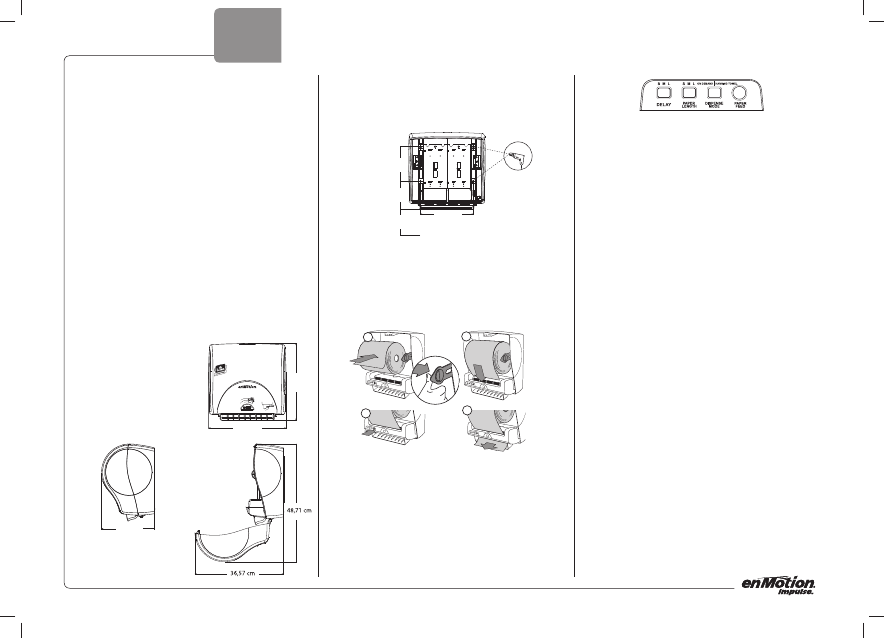
1. When placing dispenser, allow at least
10 cm clearance on all sides
2. Use template printed on the case to locate
screw holes.
Note: Using existing screw holes where
possible may simplify mounting process.
■ STEP FOUR
Mounting the dispenser template printed on the case
1. Align dispenser with screw holes. Check that the dispenser is level. Insert one screw
through slot in back of the cabinet. Tighten screw.
2. Insert each remaining screw through screw slots. Tighten all screws.
■ STEP FIVE
Loading rst roll
(See step 1-4)
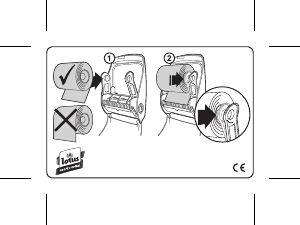
1. Place the roll as indicated in the picture 1
2. Pull towel downward and onto the rollers
3. Press the paper feed button on the lower left of the dispenser
4. Once the paper feeds through the bottom, tear o the sheet and discard.
■ STEP SIX
Adjusting the Settings
The enMotion® Impulse dispenser’s adjustable settings are located inside the dispenser on
the lower left side.
1. The “Adjustable Sheet Length” (ASL) system allows for adjustments in towel sheet
length. The sheet lengths are:
• “S” Short towel (maximum number of hand dries)
• “M” Medium towel (optimal hand dry capacity)
• “L” Long towel (largest available towel)
Note: The ASL system is pre-set at the “L” option. Set ASL to meet your needs.
2. The “Adjustable Time Delay” (ATD) system allows towels to dispense at di erent time
delay intervals after a towel is removed from the dispenser. Settings are:
• “S” Short Delay
• “M” Medium Delay
• “L” Long Delay
Note: The ATD system is pre-set at the “M” option. Set ATD to meet your needs.
3. The “The Dispense Mode” (DM) system allows for adjustment in how the towel is
presented to the end user. Settings are:
• “On Demand” (The towel will feed from the dispenser after the end user has
activated the sensor.)
• “Hanging Towel” (The towel will always be showing. After tearing o a towel,
another towel will present itself.)
Note: The DM system is pre-set at the “On Demand” option. Set DM to meet your
needs.
■ STEP SEVEN
Operating the Dispenser
1. Dispensing enMotion Towels
A. Wave hand approximately 5 cm across front of dispenser. An enMotion Towel is
automatically dispensed.
B. Once towel is dispensed, tear towel to dry hands. A second towel cannot be
dispensed until the rst towel is removed. After the towel is removed, a short
delay will occur to avoid paper waste.
Note: To adjust the delay, see Step 6, “Adjusting Settings.”
2. Replacing Batteries
A. The “low battery” light is located on the motion sensor and indicates that the
battery power is low.
Note: When indicator light appears, dispenser will continue to operate for a
limited period of time.
B. Replace batteries with 3 LR20 D-Cell alkaline batteries. Non-alkaline batteries
will have reduced life.
C. Load batteries as indicated on the diagram located on the inside lid of the battery
compartment.
■ STEP EIGHT
Troubleshooting the Dispenser
Dispense towels by moving hand in front of dispenser within sensor range and immediately
tear o towel. Repeat this procedure 1-2 times to con rm proper operation. If towel does
not dispense when moving hand in front of dispenser, open the dispenser and check the fol-
lowing:
1. Check inside the paper chute for a paper jam. If necessary, clear.
2. Check that towel is properly loaded.
3. Advance towel using paper feed button to con rm power.
4. If no power, check batteries to con rm alignment.
5. Close dispenser cover. Red light will turn o . The dispenser is ready.
ENGLISH
33,32 cm
33,60 cm
24,13 cm
1,07 m - 1,18 m
22,86 cm
12,36 cm
15,0 cm
1
2
4
3


Приклучете се во разговорот за овој производ
Тука можете да го споделите вашето мислење за Lotus Professional enMotion Impulse Автомат за хигиенски марамчиња. Ако имате прашања, најпрво прочитајте го прирачникот. Можете да побарате прирачник ако го употребите нашиот прирачник за контакт.
одговор | Ова беше корисно (0) (Преведено од Google)
одговор | Ова беше корисно (0) (Преведено од Google)