English - 5 -
during the set time, it will switch into standby mode
after the set time has expired. When you next switch-on
the TV, the following message will be displayed. “TV
switched to stand-by mode automatically because
no operation was made for a long time.” Before the
TV switches into standby mode a dialogue window will
be displayed. If you do not press any button the TV
will switch into the standby mode after a waiting period
of about 5 minutes. You can highlight Yes and press
OK to switch the TV into standby mode immediately.
If you highlight No and press OK, the TV will remain
on. You can also choose to cancel the Auto Power
Down function from this dialogue. Highlight Disable
and press OK, the TV will remain on and the function
will be cancelled. You can enable this function again by
changing the setting of the Auto Power Down option
from the Settings>System>More menu.
TV Control & Operation
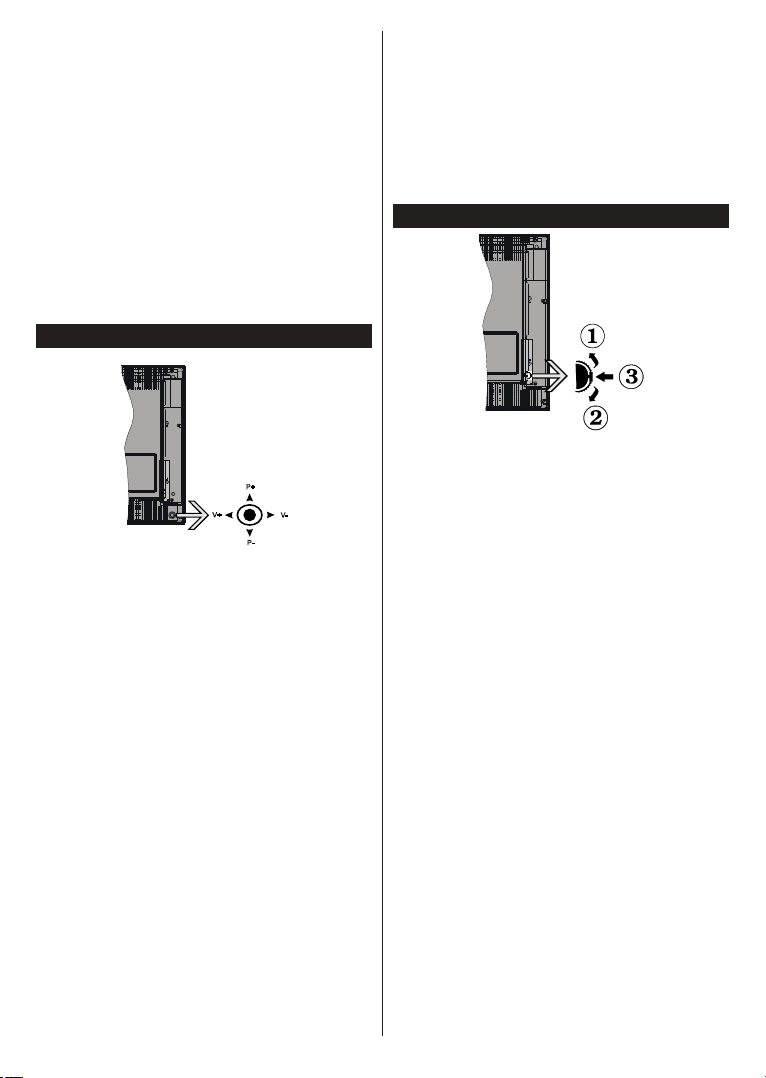
The joystick allows you to control the Volume /
Programme / Source and Standby-On functions of
the TV.
Note:
the model.
To change volume: Increase the volume by pushing
the joystick right. Decrease the volume by pushing
the joystick left.
To change channel: Scroll through the stored
channels by pushing the joystick up or down.
To change source: Press the centre of the joystick
in, the sources list will appear on the screen. Scroll
through the available sources by pushing the joystick
up or down.
Press the centre of the joystick in
and hold it down for a few seconds, the TV will turn
into standby mode.
To turn on the TV: Press the centre of the joystick in,
the TV will turn on.
Note: Main menu OSD cannot be displayed via control button.
Operation with the Remote Control
Press the Menu button on your remote control to
display main menu. Use the directional buttons and
OK button to navigate and set. Press Return/Back
or Menu button to quit a menu screen.
Input Selection
Once you have connected external systems to your
the
Source button on your remote control consecutively
Changing Channels and Volume
You can change the channel and adjust the volume
by using the Programme +/- and Volume +/- buttons
on the remote.
TV Control Switch & Operation
1. Up direction
2. Down direction
3.
The Control button allows you to control the Volume
/ Programme / Source and Standby-On functions of
the TV.
To change volume: Increase the volume by pushing
the button up. Decrease the volume by pushing the
button down.
To change channel: Press the middle of the button
in, the information banner will appear on the screen.
Scroll through the stored channels by pushing the
button up or down.
To change source: Press the middle of the button in
twice(for the second time in total), the source list will
appear on the screen. Scroll through the available
sources by pushing the button up or down.
Press the middle of the button in
and hold it down for a few seconds, the TV will turn
into standby mode.
To turn on the TV: Press the middle of the button in,
the TV will turn on.
Notes:
the volume setting.
Main menu OSD cannot be displayed via control button.
Operation with the Remote Control
Press the Menu button on your remote control to
display main menu. Use the directional buttons and


Приклучете се во разговорот за овој производ
Тука можете да го споделите вашето мислење за Hitachi H24E2200 ЛЕД телевизор. Ако имате прашања, најпрво прочитајте го прирачникот. Можете да побарате прирачник ако го употребите нашиот прирачник за контакт.