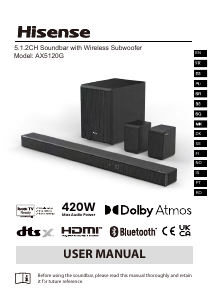
Прирачник Hisense HS205G Домашен кино-систем

Ви треба прирачник за вашиот Hisense HS205G Домашен кино-систем? Подолу можете да го погледнете и преземете PDF прирачникот бесплатно на англиски јазик. Овој производ моментално има 0 често поставувани прашања, 0 коментари и има 0 гласови. Ако ова не е прирачникот што го сакате, ве молиме контактирајте со нас.

Дали вашиот производ е дефектен и прирачникот не ви нуди решение? Одете во Repair Café за бесплатни услуги за поправка.

Прирачник
7
EN
SP
FR
DE
PT
IT
SL
HR
CZ
SK
HU
SR
BS
MK
SQ
PL
RO
Tips:
- Your TV must support the HDMI-CEC and ARC function. HDMI-CEC and
ARC must be set to On.
- The setting method of HDMI-CEC and ARC may differ depending on the
TV. For details about ARC function, please refer to your TV owners manual.
- Only HDMI 1.4 compatible cables can support the ARC function.
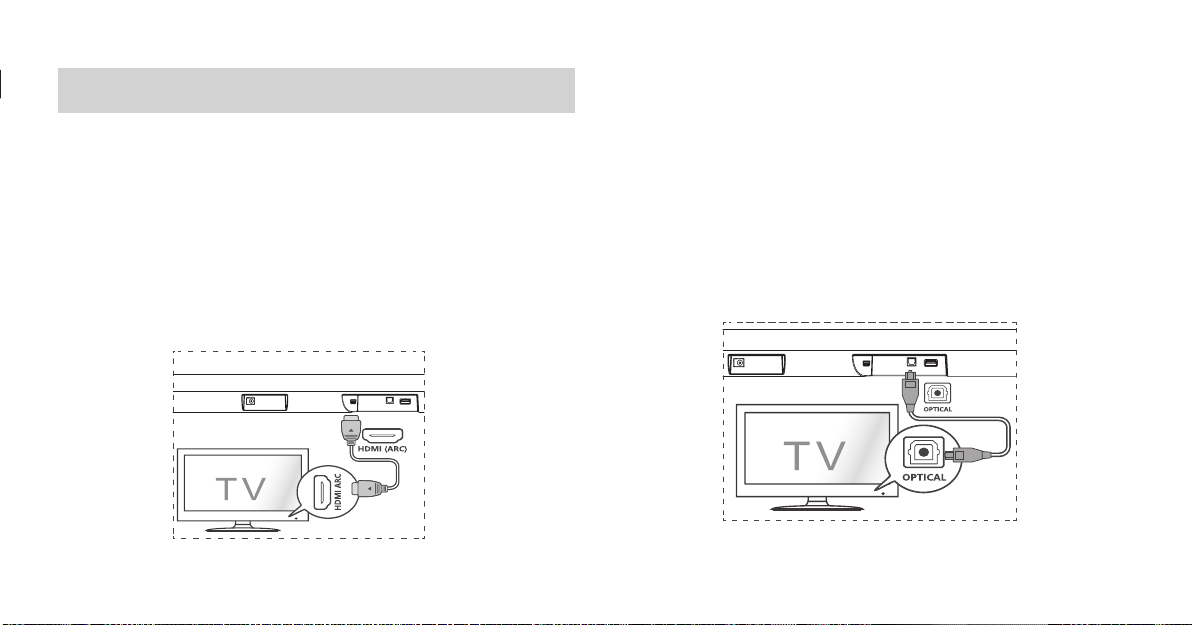
Connect to OPTICAL Socket
- Remove the protective cap of the OPTICAL cable, then connect an
OPTICAL cable to the TVs OPTICAL OUT socket and the OPTICAL socket on
the unit.
Connections
Connect to HDMI (ARC) Socket
Your Soundbar supports HDMI with Audio Return Channel (ARC). If your TV is
HDMI ARC compliant, you can hear the TV audio through your Soundbar by
using a single HDMI cable.
1 Using a High Speed HDMI cable, connect the HDMI ARC connector on your
Soundbar to the HDMI ARC Connector on the TV.
- The HDMI ARC connector on the TV might be labeled differently. For
details, see the TV user manual.
2 On your TV, turn on HDMI-CEC operations. For details, see the TV user
manual.
8
Tip:
While in OPTICAL or HDMI ARC mode, if theres no sound output from the
unit, you may need to activate PCM Signal output on your source device (eg.
TV, DVD or Blu-ray player).
Connect Power
Risk of product damage!
- Ensure that the power supply voltage corresponds to the voltage printed
on the back or the underside of the unit and the power adapter.
- Before connecting the AC power cord, ensure you have completed all
other connections.
- Connect the DC cable of the power adapter to the DC Socket of main unit.
- Connect the mains cable to the AC~ Socket of power adapter and then
into a mains socket.
* Power cord quantity and plug type vary by regions.
Basic Operation
Standby/ON
When you first connect the main unit to the mains socket, the main unit will
be in Standby mode.
Press the
button on the unit or on the remote control to switch the unit
ON.
Press the
button again to switch the unit back to STANDBY mode.
Disconnect the mains plug from the mains socket if you want to switch the
unit OFF completely.
Auto Wake
If a TV or an external device is connected (OPTICAL / HDMI ARC), the unit
will switch on automatically when the TV or the external device is switched
on and output audio signals .
How to Enable Auto Wake
Short press the (SOURCE) button and VOL + button on the unit to
enable or disable Auto Wake function.
Auto Wake On: white and green LED blink twice sequentially. While in
STANDBY mode, the RED LED is breathing.
Auto Wake Off: white and red LED blink twice sequentially. While in
STANDBY mode, the LED is in solid red.
Преземете прирачник на англиски јазик (PDF, 10.47 MB)
(Размислете за животната средина и отпечатете го овој прирачник само ако е навистина неопходно)

Оцена

Кажете ни го вашето мислење за Hisense HS205G Домашен кино-систем, така што ќе го оцените производот. Сакате ли да го споделите вашето искуство со овој производ или да поставите прашање? Оставете коментар во долниот дел на страницата.
Дали сте задоволни со Hisense HS205G Домашен кино-систем?
Да Не
Оценете го први овој производ
0 гласови

Приклучете се во разговорот за овој производ

Тука можете да го споделите вашето мислење за Hisense HS205G Домашен кино-систем. Ако имате прашања, најпрво прочитајте го прирачникот. Можете да побарате прирачник ако го употребите нашиот прирачник за контакт.

Повеќе за овој прирачник

Разбираме дека е практично да имате печатен прирачник за Hisense HS205G Домашен кино-систем. Секогаш можете да го преземете прирачникот од нашата интернет-страница и да го отпечатите сами. Ако сакате да го имате оригиналниот прирачник, ви препорачуваме да контактирате со Hisense. Тие можеби ќе можат да ви дадат оригинален прирачник. Барате прирачник за вашите Hisense HS205G Домашен кино-систем на различен јазик? Изберете го претпочитаниот јазик на нашата интернет-страница и пребарајте го бројот на модел за да видите дали го имаме.

Спецификации

Бренд Hisense
Модел HS205G
Категорија Домашни кино-системи
Тип датотека PDF
Големина на датотека 10.47 MB

Сите прирачници за Hisense Домашни кино-системи
Повеќе прирачници за Домашни кино-системи
Прирачник Hisense HS205G Домашен кино-систем

Поврзани производи

Поврзани категории

×
Download